We see it every day! Fake reviews. A 1-star Google review from a name that matches no customer you’ve ever had. It’s exhausting!
These fake reviews are dragging your business down faster than a sinking ship! With the changes in search due to AI, reviews are being heavily relied upon for information from AI search platforms. That’s why reputation management is so important!
Each bad review is slowly tanking your local SEO and driving away potential customers. Whether it's a disgruntled ex-employee, a competitor, or a spam bot, you don't have to just accept fraudulent 1-star ratings. Here is a quick guide on how to handle and remove fake reviews from your Google Business Profile.
Step 1: Flag the Review Directly on Your Profile
Don’t ignore those bad reviews! You should be responding to ALL reviews as promptly as possible to show you are engaging with your customers. So, when a bad review comes in, this is the quickest initial action you can take is to report the review directly from your public listing.
Search for your business on Google or open your listing on Google Maps.
Navigate to your Reviews section and locate the fraudulent rating.
Click the three vertical dots (⋮) next to the review.
Select Report review.
Choose the category that best describes the policy violation (see Step 2) and submit.
Step 2: Confirm It Violates Google's Policy
Google will not remove a review simply because you disagree with a customer's opinion. Sometimes, you really do need to clean up your act! However, when it legitimately has nothing to do with your business or a customer you’ve never had before, here’s how you can get that bad review deleted. Reminder: it must explicitly violate Google's content policies. Common violations that warrant removal include:
Spam and fake engagement: Reviews from people who were never actual customers.
Conflict of interest: A competitor leaving a negative rating to hurt your business.
Harassment or profanity: Abusive language, hate speech, or personal attacks.
Advertising and solicitation: Reviews that act as blatant advertisements for a rival business by dropping their phone number, website links, or promotional pricing. Note: A customer simply stating they prefer a competitor is allowed, but actively directing traffic to them crosses the line into solicitation.
Step 3: Track the Status and Appeal
Once submitted, Google uses a mix of automated systems and human moderators to evaluate the flag. You will get a reply from Google as to how they handled the review.
If Google decides not to remove the review, you will get "Report reviewed — no policy violation". Do not panic—you are allowed to submit a one-time appeal for that specific review.
Step 4: Use the Google Reviews Management Tool
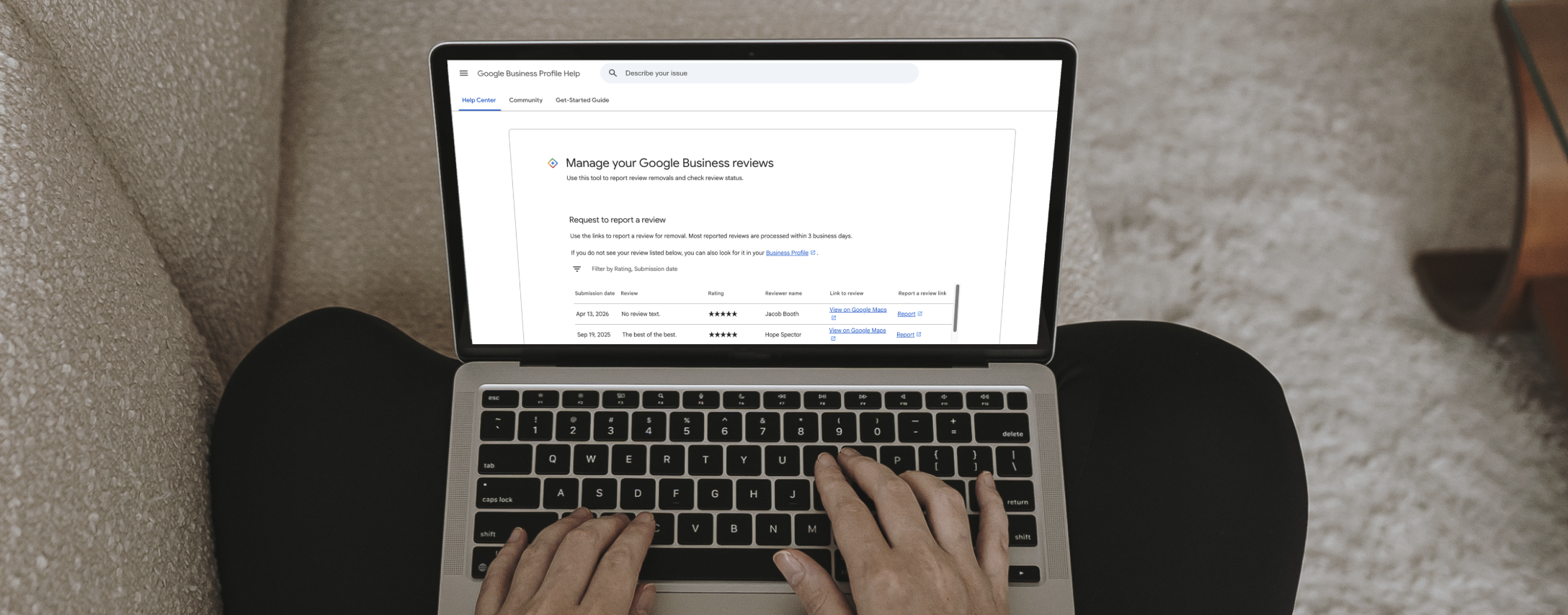
The most effective way to report a fake review and track your case is through Google's dedicated portal. When you appeal, be specific in your evidence. Note that the reviewer is not in your customer database, or point out that they mentioned a product or service you do not actually offer. Here is how to use it:
Go to the Google Reviews Management Tool and log in with the email associated with your Business Profile.
Confirm your account and select your business from the list.
From here, you can “Check the status of a review I’ve already reported and my appeal options” or “Report a new review for removal.”
If you’re checking the status, you can appeal eligible reviews from there. Or, if you’re reporting a new review, locate the fake review in your feed and click Report.
Select the specific policy violation category (such as "Spam" or "Conflict of interest") and submit your report.
Step 5: Reply Professionally While You Wait
The review removal process can take several days. While you wait, leave a public, professional reply to the fake review. State simply that you have no record of their transaction and invite them to contact your office directly to resolve the matter. This shows prospective customers reading your page that you are attentive and signals that the complaint is likely fraudulent.
Don't Let Fake Reviews Dictate Your Reputation
Dealing with fraudulent Google reviews can feel overwhelming, but you do not have to let them tarnish your hard-earned reputation. By acting quickly, utilizing both direct profile flagging and the Reviews Management Tool, and maintaining a calm, professional public response, you take back control of your reputation.
Remember that the best defense against a fake negative review is a steady stream of authentic, 5-star ratings. Make it a habit to regularly monitor your profile and actively ask your happy customers to share their genuine experiences. A strong foundation of legitimate reviews will easily overshadow a few bad actors while you wait for Google to process your removal requests and appeals.